Gravity Control WebGL
4,507 beses na nalaro

Mga detalye ng laro
Ano ang tungkol sa Gravity Control WebGL?
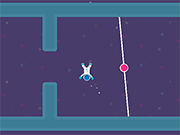
Guide the player to the wormhole that brings you to the next level. There are 60 levels to overcome. Each level challenges the player differently, some are more action-focused whereas other levels will need the player to use their brain.
Be surprised by obstacles that are needed to be avoided, like moving spikes and rotating lasers. By changing the direction of the gravity not only the player but also crates will move in the gravity direction. Some crates will operate the open and closing of nearby doors or turning the lasers on and off.
The stages will become more challenging the further you progress. How well the player is handling the floaty astronaut will determine if you don’t crash into an obstacle. In later levels switching triggers on and off will require more thinking because the number of blocks will increase.
Can we play Gravity Control WebGL on mobile?
Hindi, ang Gravity Control WebGL ay idinisenyo para sa paglalaro sa desktop at pinakamahusay itong gumagana sa mga computer na gumagamit ng keyboard o mouse.
Is Gravity Control WebGL free to play?
Oo, libre laruin ang Gravity Control WebGL sa Y8 at direktang tumatakbo ito sa iyong browser.
Can we play Gravity Control WebGL in full screen mode?
Oo, maaaring laruin ang Gravity Control WebGL sa full screen mode para sa mas nakaka-engganyong karanasan.
Kategorya:
Mga Larong Pag-iisip
Idinagdag sa
30 Nob 2019
Mga Komento


Mga kaugnay na mga laro
-

Detonator
-
Batter's Up Base Ball Math - Addition Edition
-
Math Adding
-
Battle Chess
-
Who Wants One Million?
-
Crossword
-
Prison Break
-
Chasm
-
Plumber 2
-
The Car
-
Deal or No Deal
-
Traffic Jam
-
Checkers Fun!
-
SteppenWolf (Chapter 1 - Episode 1)
-
SteppenWolf (Chapter 1 - Episode 2)
-
SteppenWolf (Chapter 1 - Episode 3)
-
SteppenWolf (Chapter 1 - Episode 4)
-
Poppit! Stress Buster